Here’s the uncomfortable truth about keyword research: most beginners either skip it entirely or treat it as a five-minute box-checking exercise before they start writing.
Both approaches produce the same outcome — content that lands on page seven of Google and stays there permanently.
Keyword research done properly isn’t a preliminary step you rush through to get to the “real” work of writing. It is the real work. It’s the difference between publishing content into active demand and publishing content into silence. And the tools you need to do it well cost nothing — which makes the skill gap between blogs that grow and blogs that flatline entirely a matter of knowledge, not budget.
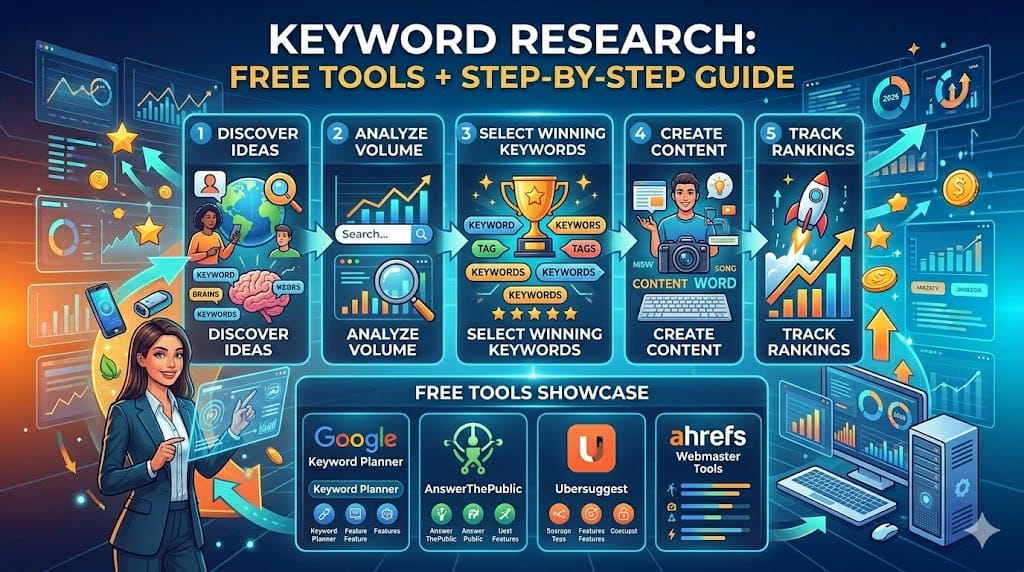
This is the process, from scratch, using only free tools.
What Keyword Research Actually Accomplishes
Before the tools and tactics, a clear-eyed statement of what you’re actually trying to do.
When someone types a query into Google, they’re expressing intent — a specific need, question, or problem at a specific moment in time. Keyword research is the discipline of mapping your content to those expressions of intent before you write anything.
The practical goal has two parts: find queries that your target audience actually searches for, and find queries where the competition hasn’t yet produced content that’s genuinely difficult to displace.
Both conditions matter. High-demand keywords with entrenched top-ranking competitors are nearly impossible for newer sites to rank for, regardless of content quality. Low-competition keywords with no real search volume rank easily and send nobody. The research task is finding the intersection — meaningful demand, realistic competition — and that’s a skill that compounds as you develop intuition for what that intersection looks like across different topics and niches.
The Keyword Research Framework: Three Layers
Think of keyword research as working through three layers, from broadest to most specific.
Layer 1: Seed keywords — your starting point. These are the general topics and terms that broadly describe your niche. “Email marketing,” “Python tutorial,” “dropshipping.” You’re not going to rank for these. They’re the raw material you use to discover specific opportunities.
Layer 2: Long-tail variations — specific phrases with clear intent. “How to write a welcome email sequence for Shopify,” “Python tutorial for data analysts with no coding experience,” “is dropshipping still profitable in 2026.” These are what real people actually type. The search volume is lower than seed keywords, but the intent is more specific, the competition is usually lower, and the conversion rate from this traffic is higher because visitors know exactly what they want.
Layer 3: Question-based keywords — queries phrased as questions. “What is the best email marketing tool for small businesses?” “How long does it take to learn Python?” “Why is my Shopify checkout abandonment rate so high?” These are particularly valuable because Google increasingly surfaces direct answers to questions in featured snippets and AI Overviews — meaning a well-structured answer to a specific question has a chance to appear in position zero regardless of your domain authority.
Your content calendar should be built predominantly from Layer 2 and Layer 3 keywords. Seed keywords give you direction; the specific variations are where you actually operate.
Tool 1: Google Autocomplete and Related Searches
Cost: Free. No account required.
This is the most underrated keyword research tool available — and it’s built into the search engine you’re already optimizing for.
How to use it:
Open an incognito browser window (to avoid your personal search history skewing suggestions) and type your seed keyword into Google. Before pressing Enter, look at the dropdown suggestions. These are real queries Google has seen frequently enough to autocomplete — direct insight into how your audience phrases their searches.
Type your seed keyword, then add a space and a letter: “email marketing a,” “email marketing b,” etc. Cycle through the alphabet. Each letter surfaces a different set of common queries. You’ll find combinations you’d never have thought to search for — and some of them will reveal content gaps nobody in your niche has addressed well.
Related Searches (at the bottom of the search results page) and People Also Ask (the expandable questions that appear mid-results) serve a similar function. Related Searches shows you adjacent queries that searchers frequently pivot to — often revealing the next article in a logical content series. People Also Ask is a direct window into the specific sub-questions Google knows searchers have around your topic. Every question in that box is a potential H2 heading in your article.
The “tilde trick” for synonym discovery: Searching ~your keyword (with a tilde before it) in older-style Google search used to surface synonym-based results explicitly. Modern Google does this algorithmically, but manually searching synonym variations of your seed keyword reveals related terms your audience uses that you might not have thought of.
Spend 20 minutes on a single topic using autocomplete and Related Searches alone, and you’ll have more content ideas than you can publish in a month.
Tool 2: Google Search Console
Cost: Free. Requires connecting to your website.
If your site has been live for any meaningful period, Google Search Console is the single most valuable keyword research tool you have — because it shows you the actual queries real users typed to find your site, including queries your pages are already ranking for that you never specifically targeted.
Where to find it: Performance → Search results. The default view shows clicks and impressions over the last three months. Click “Queries” to see your top-performing search terms.
Three ways to use it for research:
Find low-hanging ranking opportunities. Sort your queries by impressions and look for terms where your average position is between 8 and 20. These are queries where Google already considers your content relevant enough to show — just not high enough to get significant clicks. Publishing a dedicated, more thorough article targeting that query specifically (or significantly improving the existing page’s depth and on-page optimization) often moves these from page two to page one with relatively little effort.
Discover unintentional rankings. You’ll find queries driving impressions that you never specifically wrote about. These are roadmap items — topics your existing content touches on that your audience is actively searching for, which would benefit from a dedicated article.
Identify seasonal patterns. Change the date range to compare the last 3 months against the same period a year ago. Queries that spike in certain months tell you when to publish content to capture peak demand — and when to start building topical authority before the season arrives.
Search Console is particularly powerful for sites that have been publishing for 6–12+ months. If your site is brand new, the data is sparse, but it still provides the queries you’ve ranked for even with limited authority — start using it from day one so the historical data accumulates.
Tool 3: Ubersuggest
Cost: Free tier (limited daily searches). Optional paid upgrade at ~$29/month.
Ubersuggest, built by Neil Patel, is the most useful free third-party keyword tool for beginners because it shows you the metrics that actually drive keyword selection decisions — search volume, SEO difficulty, paid difficulty — in a single interface that doesn’t require a marketing degree to interpret.
How to use it for keyword research:
Enter your seed keyword in the search bar and select your target country. Ubersuggest shows you:
- Monthly search volume: How many times this exact keyword is searched per month
- SEO Difficulty (SD): A 0–100 score estimating how hard it is to rank on page one. Under 30 is generally achievable for newer sites; 40–60 is competitive; above 60 is very difficult without significant domain authority
- Paid Difficulty (PD): How competitive the keyword is for paid search — a useful proxy for commercial intent. High PD means advertisers are paying to appear for this term, which means there’s purchase intent behind it
- CPC: The estimated cost per click for paid ads — another commercial intent signal
Below the main keyword, Ubersuggest shows “Keyword Ideas” — a list of related terms, questions, comparisons, and long-tail variations. This is where most of the usable research comes from. Filter by SD below 30 and sort by volume to find the specific long-tail variations that balance realistic ranking difficulty with meaningful search traffic.
One practical workflow: Start with a seed keyword, collect 15–20 related terms from the Keyword Ideas list, filter by SD and volume, and identify 5–8 that hit the sweet spot. Those are your next batch of article topics.
The free tier limits you to three searches per day on an unregistered account, and around ten searches per day with a free account. That’s enough for focused daily research sessions without needing to upgrade.
Tool 4: AnswerThePublic
Cost: Free tier (limited searches). Acquired by Neil Patel in 2022 and now integrated with Ubersuggest.
AnswerThePublic visualizes the questions, prepositions, and comparisons real people search around any topic — organized into a visual “search listening” map that makes it immediately obvious which angles have the most search interest.
Enter a seed keyword and it generates questions categorized by who, what, when, where, why, how, which, and can/are/will. It also generates comparison phrases (“X vs Y”) and alphabetical variations.
The practical value: it rapidly surfaces question-format keywords that are well-suited to featured snippets and AI Overview citations. A blog that consistently answers specific, well-phrased questions on its topic builds the kind of topical authority Google rewards with increased visibility across the entire niche — not just for individual keywords.
Use AnswerThePublic at the beginning of a new content cluster to get an overview of the question landscape, then use Ubersuggest to check volume and difficulty on the most promising ones.
Tool 5: Ahrefs Webmaster Tools (Free Tier)
Cost: Free with site verification.
Ahrefs’ paid tool is the gold standard for professional SEO research. Their free Webmaster Tools tier is limited — you can only see data for your own verified site — but what it shows you is genuinely valuable.
Organic keywords report: Every keyword your site ranks for, with position, traffic, and the specific page ranking. More complete than Search Console for keyword discovery, particularly for sites with established authority.
Site audit: A crawl of your entire site identifying technical SEO issues — broken links, missing meta descriptions, slow pages, duplicate content. Worth running quarterly even if you don’t pay for the full tool.
For competitors’ keyword data, you’d need the paid version. But for understanding your own site’s keyword profile and finding optimization opportunities, the free tier competes with tools that cost $100+/month.
The Research-to-Publication Workflow
Understanding individual tools is one thing. Having a repeatable process that connects research to content creation is what makes keyword research sustainable rather than something you do once and forget.
Here’s the workflow that keeps a content calendar consistently stocked:
Weekly (30 minutes): Run one seed keyword through Ubersuggest. Collect 10–15 long-tail variations. Add the best 3–5 to a keyword bank (a simple spreadsheet works fine — columns for keyword, search volume, difficulty, intent type, assigned to article or not).
Monthly (60 minutes): Review Google Search Console for new impressions on queries you haven’t targeted. Check which existing articles have dropped in ranking — these may need updating or expanding. Use AnswerThePublic on the month’s main topic cluster to fill in question-based content gaps.
Before each article: Pull the target keyword from your bank. Run it through autocomplete to check for related angles. Review the top three current-ranking pages to confirm search intent and identify differentiation opportunities. Then write.
This cadence takes less than two hours per month and keeps the keyword bank perpetually stocked with more ideas than you can publish — which means you’re always writing toward demand rather than scrambling for topics.
The Metric That Matters Most (That Most Tools Don’t Show)
Every keyword tool shows you search volume and difficulty. Neither is the metric that matters most for a new blog.
The metric that matters most is search intent match — whether your planned article genuinely and completely answers what the person searching that keyword wants to know.
A keyword with 500 monthly searches and low difficulty is worthless if the searcher wants a product comparison and you write an explainer guide. The traffic arrives, finds the wrong answer, and leaves in fifteen seconds — which Google interprets as a signal that your page doesn’t satisfy the query, suppressing it further.
Before committing to any keyword, search it yourself. Read the top results. Ask: what is the person who typed this actually trying to accomplish? Write the article that answers that completely — better than anything currently ranking. Volume and difficulty determine whether the opportunity exists. Intent match determines whether your execution earns it.
That judgment call — reading intent correctly and writing to it — is the one keyword research skill no tool automates. It’s also, not coincidentally, the one that separates blogs that consistently rank from blogs that consistently don’t.
Up next: Google SGE & AI Overviews — What It Means for Your Blog — how Google’s AI-generated search summaries are changing organic traffic in 2026, and what to optimize for.