Every beginner programmer eventually hits the same wall.
Variables make sense. Functions make sense. Loops and conditionals make sense. Then someone says “now let’s talk about object-oriented programming” — and suddenly everything that was clicking stops clicking.
OOP has a reputation for being conceptually dense, and that reputation is partially earned. The terminology — classes, objects, instances, inheritance, encapsulation, polymorphism — lands in a cluster, each concept referencing the others, making it feel like you need to understand all of it before you can understand any of it.
The way through that wall isn’t more terminology. It’s a mental model that makes the concepts feel obvious rather than arbitrary. Once you have it, the rest follows naturally.
Here’s that mental model, built from scratch with real Python code at each step.
Why OOP Exists: The Problem It Solves
Before understanding what OOP is, it helps to understand what programming looked like without it — and why that was a problem at scale.
Imagine you’re building software to manage a library. You need to track books: each book has a title, an author, a ISBN number, whether it’s currently checked out, and who checked it out. You write variables for one book:
python
book_title = "The Pragmatic Programmer"
book_author = "David Thomas"
book_isbn = "978-0135957059"
book_checked_out = False
book_borrower = None
Fine for one book. Now you have 10,000 books. You’d have 50,000 variables, no reliable way to group the data that belongs together, and no consistent structure for the operations — checking out a book, returning it, searching by author — that need to work consistently across all of them.
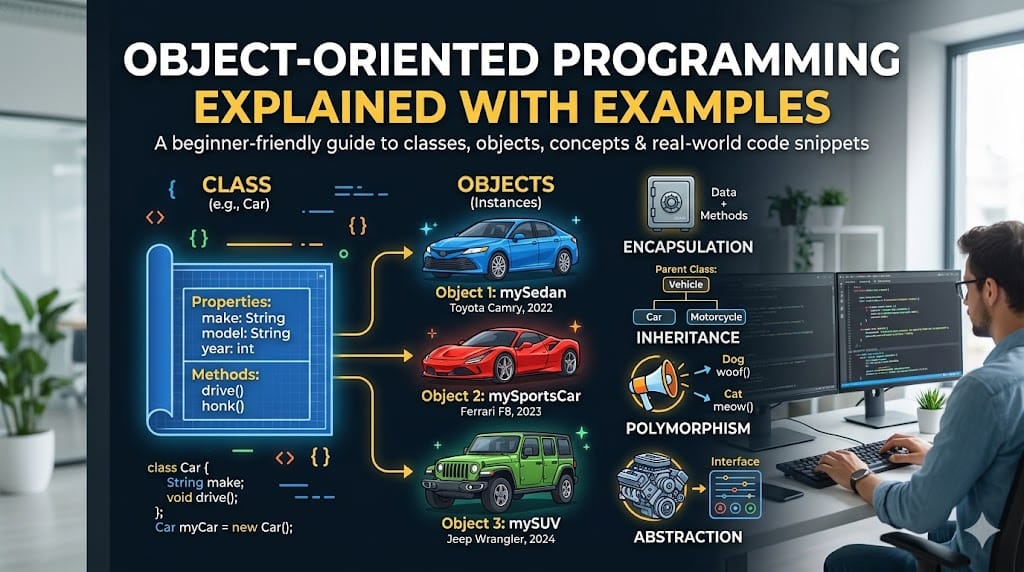
Object-oriented programming solves this by letting you create blueprints — called classes — that define what a thing is (its data) and what it can do (its behavior). Then you create as many specific instances of that blueprint as you need — called objects — each holding its own data but sharing the same structure and behavior.
One blueprint. Unlimited consistent instances. Operations defined once, applied everywhere.
Classes and Objects: The Blueprint and the Building
A class is a template. An object is a specific thing built from that template.
The class defines the structure. The object holds the actual data.
Here’s a Book class in Python:
python
class Book:
    def __init__(self, title, author, isbn):
        self.title = title
        self.author = author
        self.isbn = isbn
        self.checked_out = False
        self.borrower = None
Let’s unpack every line:
class Book: — declares a new class named Book. The capital letter is convention, not requirement — but follow it, because every Python programmer expects class names to be capitalized.
def __init__(self, title, author, isbn): — this is the constructor: the special method that runs automatically whenever you create a new object from this class. Think of it as the setup instructions that run the moment a new book is added to the system.
self — this is how Python refers to “the specific object being created right now.” When you have 10,000 Book objects, self is how each one refers to its own data rather than another object’s data. It’s always the first parameter of any method in a class, and Python passes it automatically.
self.title = title — this creates an attribute called title on the object and sets it to whatever was passed in as the title parameter.
Now create actual Book objects:
python
book1 = Book("The Pragmatic Programmer", "David Thomas", "978-0135957059")
book2 = Book("Clean Code", "Robert Martin", "978-0132350884")

print(book1.title)   # The Pragmatic Programmer
print(book2.author)  # Robert Martin
book1 and book2 are two separate objects — each with their own title, author, isbn, checked_out, and borrower attributes. They were built from the same Book blueprint but hold completely independent data.
Methods: Giving Objects Behavior
An object isn’t just a container for data — it can also do things. Functions defined inside a class are called methods, and they operate on the object’s own data.
Let’s add checkout and return functionality to our Book class:
python
class Book:
    def __init__(self, title, author, isbn):
        self.title = title
        self.author = author
        self.isbn = isbn
        self.checked_out = False
        self.borrower = None

    def check_out(self, borrower_name):
        if self.checked_out:
            print(f"'{self.title}' is already checked out by {self.borrower}.")
        else:
            self.checked_out = True
            self.borrower = borrower_name
            print(f"'{self.title}' checked out to {borrower_name}.")

    def return_book(self):
        if not self.checked_out:
            print(f"'{self.title}' is already in the library.")
        else:
            self.checked_out = False
            self.borrower = None
            print(f"'{self.title}' has been returned.")

    def status(self):
        if self.checked_out:
            return f"'{self.title}' — checked out by {self.borrower}"
        return f"'{self.title}' — available"
Now books can perform actions:
python
book1 = Book("The Pragmatic Programmer", "David Thomas", "978-0135957059")

book1.check_out("Alice")     # 'The Pragmatic Programmer' checked out to Alice.
book1.check_out("Bob")       # 'The Pragmatic Programmer' is already checked out by Alice.
print(book1.status())        # 'The Pragmatic Programmer' — checked out by Alice
book1.return_book()          # 'The Pragmatic Programmer' has been returned.
print(book1.status())        # 'The Pragmatic Programmer' — available
Notice what we’ve accomplished: the logic for checking out a book — validating whether it’s already borrowed, updating the right attributes, producing the right output — lives inside the Book class. Anywhere in the program you work with a Book object, this behavior is available. Write the logic once, use it everywhere, and changing how checkout works means changing it in one place.
Encapsulation: Protecting What Shouldn’t Be Changed Directly
Encapsulation is the principle of bundling data and the methods that operate on it together in one place — and controlling what can be accessed or changed from outside the class.
The practical motivation: some attributes should only be modified through specific methods, not directly. If you let any part of your code modify book.checked_out = True directly, bypassing the check_out() method, you lose the validation logic that prevents a book from being double-booked. Encapsulation prevents that.
In Python, the convention for marking an attribute as “internal — don’t touch directly” is a leading underscore:
python
class BankAccount:
    def __init__(self, owner, initial_balance):
        self.owner = owner
        self._balance = initial_balance   # _ signals: treat as private

    def deposit(self, amount):
        if amount <= 0:
            raise ValueError("Deposit amount must be positive.")
        self._balance += amount
        print(f"Deposited ${amount}. New balance: ${self._balance}")

    def withdraw(self, amount):
        if amount > self._balance:
            raise ValueError("Insufficient funds.")
        if amount <= 0:
            raise ValueError("Withdrawal amount must be positive.")
        self._balance -= amount
        print(f"Withdrew ${amount}. New balance: ${self._balance}")

    def get_balance(self):
        return self._balance
python
account = BankAccount("Alice", 1000)
account.deposit(500)     # Deposited $500. New balance: $1500
account.withdraw(200)    # Withdrew $200. New balance: $1300
print(account.get_balance())  # 1300

# This works technically in Python, but violates encapsulation:
# account._balance = 1000000  # Don't do this
The underscore on _balance tells other developers: access this through the provided methods (deposit, withdraw, get_balance), not directly. The validation logic inside those methods is why — it ensures the balance is only ever modified in ways that make sense for a bank account.
Python uses convention rather than hard enforcement here (unlike Java or C++, which have explicit private keywords). The double-underscore prefix (__balance) does trigger Python’s name mangling, making direct external access harder — but the single underscore convention is what you’ll see most commonly in practice.
The key concept: encapsulation means the object controls how its own data is changed. External code interacts through the interface (the methods), not the implementation (the raw attributes).
Inheritance: Building on What Already Exists
Inheritance lets you create a new class that automatically has all the attributes and methods of an existing class — and then extend or modify it for a more specific use case.
Imagine our library handles both physical books and digital ebooks. They share most attributes (title, author, ISBN) and behaviors (checking out, returning), but differ in a few ways: ebooks have a file size, can be downloaded, and might allow simultaneous checkouts.
Without inheritance, you’d duplicate the entire Book class and modify it — which means maintaining two nearly-identical classes forever. With inheritance:
python
class Book:
    def __init__(self, title, author, isbn):
        self.title = title
        self.author = author
        self.isbn = isbn
        self.checked_out = False
        self.borrower = None

    def check_out(self, borrower_name):
        if self.checked_out:
            print(f"'{self.title}' is already checked out.")
        else:
            self.checked_out = True
            self.borrower = borrower_name
            print(f"'{self.title}' checked out to {borrower_name}.")

    def status(self):
        if self.checked_out:
            return f"'{self.title}' — checked out by {self.borrower}"
        return f"'{self.title}' — available"


class Ebook(Book):   # Ebook inherits from Book
    def __init__(self, title, author, isbn, file_size_mb):
        super().__init__(title, author, isbn)   # run Book's __init__
        self.file_size_mb = file_size_mb
        self.max_simultaneous = 3               # ebooks allow 3 at once
        self.current_borrowers = []

    def check_out(self, borrower_name):         # override the parent method
        if len(self.current_borrowers) >= self.max_simultaneous:
            print(f"'{self.title}' has reached its simultaneous checkout limit.")
        elif borrower_name in self.current_borrowers:
            print(f"{borrower_name} already has '{self.title}'.")
        else:
            self.current_borrowers.append(borrower_name)
            print(f"'{self.title}' downloaded by {borrower_name}.")

    def download_size(self):
        return f"'{self.title}' — {self.file_size_mb}MB"
python
ebook = Ebook("Clean Code", "Robert Martin", "978-0132350884", 4.2)

ebook.check_out("Alice")    # 'Clean Code' downloaded by Alice.
ebook.check_out("Bob")      # 'Clean Code' downloaded by Bob.
print(ebook.download_size())  # 'Clean Code' — 4.2MB
print(ebook.author)           # Robert Martin  ← inherited from Book
Key things happening here:
class Ebook(Book): — Ebook inherits from Book. Everything in Book is automatically available in Ebook.
super().__init__(title, author, isbn) — super() calls the parent class (Book)’s __init__ method. This sets up the shared attributes without rewriting them.
def check_out(self, borrower_name): inside Ebook — this overrides the parent’s check_out method with ebook-specific logic. When you call ebook.check_out(), Python uses the Ebook version, not the Book version. This is called method overriding, and it’s what makes inheritance genuinely flexible rather than just code copying.
ebook.author — this attribute was defined in Book.__init__, not Ebook.__init__, but Ebook inherits it automatically.
Putting It Together: When to Use OOP
OOP isn’t the right tool for every Python script. A 30-line script that processes a CSV file probably doesn’t need classes. A function that converts Fahrenheit to Celsius definitely doesn’t need a class.
Use OOP when:
You’re modeling real-world entities with complex state. Books, users, orders, bank accounts, products — things that have multiple attributes that change over time and operations that must modify those attributes consistently. This is the natural habitat of a class.
You have multiple instances of the same type of thing. If your code manages one bank account, variables might be fine. If it manages 10,000 bank accounts, you need a BankAccount class.
You have related types that share common behavior. Books and Ebooks. Admin users and regular users. Credit card payments and bank transfer payments. Inheritance makes these relationships explicit and eliminates duplication.
Your codebase is growing and needs organization. Classes group related data and behavior together, which makes large codebases navigable. When you come back to a 5,000-line Python file six months later, a well-organized class structure tells you immediately what each piece does and where the relevant code lives.
The test: if you’re writing the same data structure and the same operations on it in multiple places, a class is probably the right abstraction.
The Four Concepts, Condensed
If you close this article and remember only four things:
Class — a blueprint that defines the attributes and methods a type of object will have. class Book: defines what every book in your system looks like.
Object — a specific instance of a class, with its own data. book1 = Book("Clean Code", ...) is one specific book.
Encapsulation — bundling data and the methods that manage it together, and controlling how that data is accessed and modified. The BankAccount class protects _balance by only allowing changes through deposit() and withdraw().
Inheritance — creating a new class that automatically gets everything from a parent class, then extending or overriding specific parts. Ebook inherits from Book and overrides check_out() to handle simultaneous borrowers.
These four concepts are the foundation of object-oriented programming in Python and every other OOP language. The syntax varies — Java uses extends where Python uses class Child(Parent), for example — but the underlying ideas are the same everywhere.
Learn them here in Python. They’ll transfer directly to any language you pick up next.
Up next: How to Build a REST API With Node.js and Express — a hands-on tutorial from project setup to working endpoints, built for developers who learn by doing.