Most SEO guides separate on-page optimization into a list of individual tactics. Read enough of them and you end up with a collection of things you vaguely know you should do, no clear order to do them in, and no reliable way to know when a page is actually done.
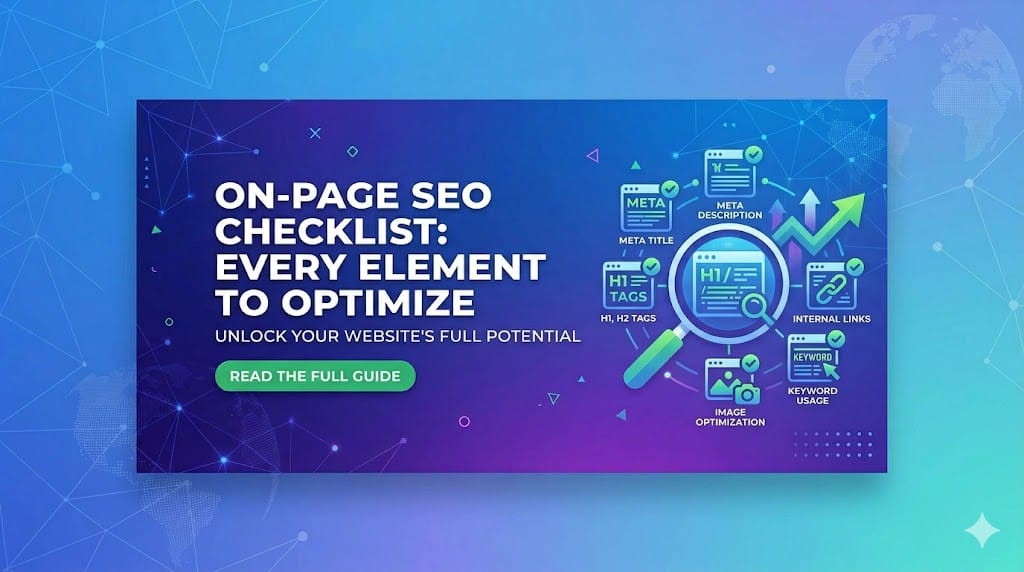
This guide is different. It’s a complete, sequenced checklist — covering every meaningful on-page element, explained with enough context to understand why each one matters, not just that it does. Work through it once per article before publishing, and you’ll have done everything within your control to give that page its best possible chance of ranking.
The checklist is organized into five sections: pre-writing research, title and meta elements, content body, images and media, and internal/external links. Each element is marked with whether Yoast SEO checks it automatically, and what requires manual judgment beyond what any plugin can assess.
Section 1: Pre-Writing Research (Before You Write a Word)
These are the decisions that determine whether your article has a chance of ranking before you’ve written a single sentence. Getting them wrong at the outset means no amount of on-page optimization will compensate.
☐ Primary keyword selected with clear search intent
One primary keyword per article. Not a topic — a specific phrase with defined intent. Before writing, verify the intent by searching the keyword yourself: is Google returning how-to guides, list posts, definitions, or product comparisons? Your article format must match what’s already ranking, because Google has already determined what format satisfies this query.
☐ Keyword difficulty is realistic for your domain
A keyword with an SEO difficulty score above 60 (in Ubersuggest or Ahrefs) is extremely difficult for a newer site to rank for regardless of content quality. Target keywords below 30 if your site is under 12 months old or has limited backlinks. This isn’t defeatism — it’s triage. Ranking on page one for a low-competition keyword that sends 300 visits per month beats not ranking at all for a high-competition keyword that theoretically sends 30,000.
☐ SERP analyzed for content gaps
Before writing, read the top three ranking articles for your target keyword. Note what they cover, what they skip, what questions they raise without answering. Your article needs to do everything they do and at least one thing they don’t. Content that merely replicates what’s already ranking has no structural reason to displace it.
☐ Search volume sufficient to justify the investment
A keyword with fewer than 50 monthly searches is typically only worth targeting if it’s part of a topical cluster building authority toward a broader keyword. Standalone articles targeting very low-volume keywords rarely justify the production time.
Section 2: Title Tag and Meta Elements
These elements are what Google shows in search results before anyone clicks. They determine your click-through rate — which is both a direct traffic driver and a behavioral signal Google uses to evaluate whether your result satisfies the query.
☐ Title tag contains the primary keyword
Your title tag should contain your primary keyword as naturally as possible — ideally near the beginning. Search engines weight early-appearing words more heavily, and front-loaded keywords also improve click-through by immediately confirming relevance to the searcher.
Yoast checks this: ✅ yes
☐ Title tag is under 60 characters
Google truncates titles beyond roughly 60 characters in desktop search results. A truncated title with “…” is less compelling than a complete one. Yoast’s title width meter turns green under 60 characters.
Yoast checks this: ✅ yes — colored title width bar (green / orange / red)
☐ Title is written to earn a click, not just describe the content
This is the judgment call Yoast cannot make. “What Is Keyword Research” describes the article. “What Is Keyword Research (And Why Most Blogs Get It Wrong)” creates curiosity and implies the reader will learn something new. The more competitive a keyword, the more critical this becomes — you’re competing against four other results for the same searcher’s attention.
Yoast checks this: ❌ manual judgment required
☐ URL slug is short, lowercase, keyword-first, and hyphenated
/on-page-seo-checklist/ — not /blog/2026/04/29/a-complete-guide-to-on-page-seo-optimization-elements/. Remove stop words (a, the, in, for, of). Set the slug before publishing — changing it afterward breaks inbound links and requires a redirect.
Yoast checks this: ✅ partial — checks for keyword in slug but not verbosity
☐ Meta description contains the keyword and is under 156 characters
Meta descriptions don’t directly influence rankings, but they influence click-through rate. Write it as a value proposition: what specifically will the reader get from clicking this result? Google bolds matching terms in the snippet, which improves visual prominence. Yoast turns red above 156 characters.
Yoast checks this: ✅ yes — character count meter plus keyword presence
☐ Meta description is unique to this page
Duplicate meta descriptions across multiple pages signal thin or undifferentiated content. Every page should have a unique meta description written specifically for that page’s intent.
Yoast checks this: ❌ manual — Yoast doesn’t cross-reference other pages
Section 3: Content Body
This section requires the most judgment — because content quality is ultimately something no checklist fully captures. What follows are the verifiable, checkable elements. Great writing on top of these is what actually earns rankings.
☐ Primary keyword appears in the first 100 words
The opening paragraph should confirm to both readers and search engines that the article is about what the title promised. Don’t contort sentences to force the keyword in — if your opening paragraph doesn’t naturally mention the topic, rewrite the opening.
Yoast checks this: ✅ yes — “keyphrase in introduction” check
☐ Article has exactly one H1
Most CMS platforms automatically use the post title as H1 — so if you’re using Yoast and entering your title in the standard title field, this is handled. The issue arises when page builders or themes add additional H1 elements to templates. Check rendered HTML to confirm.
Yoast checks this: ✅ partial — flags multiple H1s
☐ H2 and H3 headings are used for structure, not decoration
Every heading should reflect genuine organizational structure. An H2 should introduce a major section; an H3 should subdivide an H2 when there are multiple discrete components. Don’t use headings just to break up text visually — use them when the content actually has distinct sections.
Yoast checks this: ✅ partial — checks for subheading presence but not structural quality
☐ Primary keyword appears in at least one H2
Including the target keyword in a subheading reinforces topical relevance signals. Once, naturally placed in an H2, is sufficient — no need to repeat it in every heading.
Yoast checks this: ✅ yes
☐ Keyword density is natural — not stuffed
Yoast recommends 0.5%–3% keyword density. Write for humans first: if your keyword appears naturally every few hundred words, you’re in range. Semantic variations and related terms contribute to topical depth without stuffing — and modern Google understands synonyms.
Yoast checks this: ✅ yes — keyphrase density meter
☐ Content length matches topic depth, not an arbitrary word count
There is no universal ideal length. The right length is: long enough to answer the query more completely than any competing result, and no longer. Padding to reach a word count target produces content that’s worse, not better. Run a gap analysis against top-ranking results and ensure your article addresses everything they cover plus the gaps they miss.
Yoast checks this: ❌ manual judgment required
☐ Publish date is current or article has been recently updated
For time-sensitive topics, freshness is a ranking signal. A 2021 article about “best SEO tools” signals outdated information. Review and update evergreen content at least annually — and update the publish date when you make substantive changes (not just cosmetic edits).
Yoast checks this: ❌ manual
Section 4: Images and Media
Images affect rankings through Google Image Search and through page load speed, which is a confirmed Core Web Vitals ranking factor.
☐ All images have descriptive alt text
Alt text serves two purposes: accessibility for screen reader users, and contextual signal for Google’s image indexing. Write alt text as a brief, accurate description of what the image shows. Include the primary keyword where genuinely relevant to the image content — but don’t keyword-stuff alt tags.
Good: "Screenshot of Yoast SEO green light checklist in WordPress" Bad: "SEO checklist on-page SEO best SEO 2026 optimization"
Yoast checks this: ✅ yes — flags images with missing alt text
☐ At least one image has alt text containing the focus keyword
Yoast checks this: ✅ yes — specifically checks for keyword in at least one alt attribute
☐ Images are compressed before upload
Uncompressed images are one of the most common causes of slow page load. A 4MB PNG hero image adds seconds to load time and directly harms LCP (Largest Contentful Paint) scores. Use WebP format where possible — typically 25–35% smaller than equivalent JPEGs — and compress through Squoosh, TinyPNG, or ShortPixel before uploading. WordPress plugins like Imagify automate this at upload.
Yoast checks this: ❌ manual — use PageSpeed Insights to audit
☐ Image filenames are descriptive before upload
lumbar-support-cushion-ergonomic.jpg tells Google something about the image. IMG_4829.jpg tells it nothing. Rename images with descriptive, hyphenated, lowercase filenames before uploading. This is a one-time action that can’t be undone retroactively without re-uploading.
Yoast checks this: ❌ manual
Section 5: Internal and External Links
Links are how Google discovers and distributes authority across your site — and how readers navigate to related content.
☐ Article links to at least two relevant internal pages
Every new article should link to two or more existing articles on related topics. Use descriptive anchor text that describes the content of the linked page — not “click here.” This helps Google understand content relationships and distributes link equity.
Yoast checks this: ✅ partial — Yoast flags articles with no internal links
☐ Existing articles updated to link back to this new article
When you publish something new, go back to two or three existing related articles and add a natural internal link to the new piece. New articles discovered only through sitemaps — and not through internal links — rank more slowly because Google assigns them less contextual authority.
Yoast checks this: ❌ manual — requires checking other pages
☐ At least one external link to an authoritative source
Linking out to authoritative sources signals topical credibility. Use target="_blank" to open external links in a new tab, and rel="noopener noreferrer" for security. You’re not losing traffic by linking out — you’re demonstrating that your content is grounded in evidence.
Yoast checks this: ✅ partial — Yoast flags articles with no outbound links
☐ No broken links on the page
A link returning a 404 error is a negative signal for both users and crawlers. Before publishing, click every link in the article to confirm it resolves. On existing pages, run periodic checks using Screaming Frog or Google Search Console’s Coverage report.
Yoast checks this: ❌ manual — Yoast doesn’t check link validity
The Master Checklist (Copy and Use Every Time)
PRE-WRITING
☐ Primary keyword with clear search intent
☐ Keyword difficulty < 30 for newer sites
☐ SERP analyzed — content gaps identified
☐ Search volume sufficient to justify investment

TITLE & META
☐ Title contains keyword near the start
☐ Title under 60 characters
☐ Title written to earn a click (not just describe)
☐ URL slug: short, lowercase, keyword-first, hyphenated
☐ Meta description under 156 characters
☐ Meta description contains keyword + value proposition
☐ Meta description unique to this page

CONTENT BODY
☐ Keyword in first 100 words
☐ Exactly one H1 on the page
☐ H2/H3 headings reflect genuine document structure
☐ Keyword appears in at least one H2
☐ Keyword density natural (0.5–3%)
☐ Length matches topic depth — no padding
☐ Publish/update date is current

IMAGES & MEDIA
☐ All images have descriptive alt text
☐ At least one image alt text contains focus keyword
☐ Images compressed (WebP preferred, < 200KB each)
☐ Image filenames descriptive before upload

INTERNAL & EXTERNAL LINKS
☐ Links to 2+ relevant internal pages (descriptive anchor text)
☐ Existing articles updated to link back to this page
☐ At least one outbound link to authoritative source
☐ No broken links on the page
What the Checklist Cannot Assess
Every item above is verifiable. Green lights in Yoast, confirmed links, compressed images — these are binary. Done or not done.
What the checklist cannot assess is whether your content is genuinely better than what’s already ranking. That requires reading competing results with honest eyes and asking: if I were the searcher, would I choose this article over the ones currently on page one?
If the answer is yes, publish. If it’s uncertain, identify the specific gap and fill it first. If it’s no, the on-page optimization won’t fix the content problem — it will only optimize a page that shouldn’t be published yet.
The checklist is the floor. The quality of your writing and the depth of your expertise determine the ceiling.
Up next: Email Marketing 101 — how to choose an ESP, write subject lines that actually get opened, and build a welcome email sequence that converts subscribers from day one.