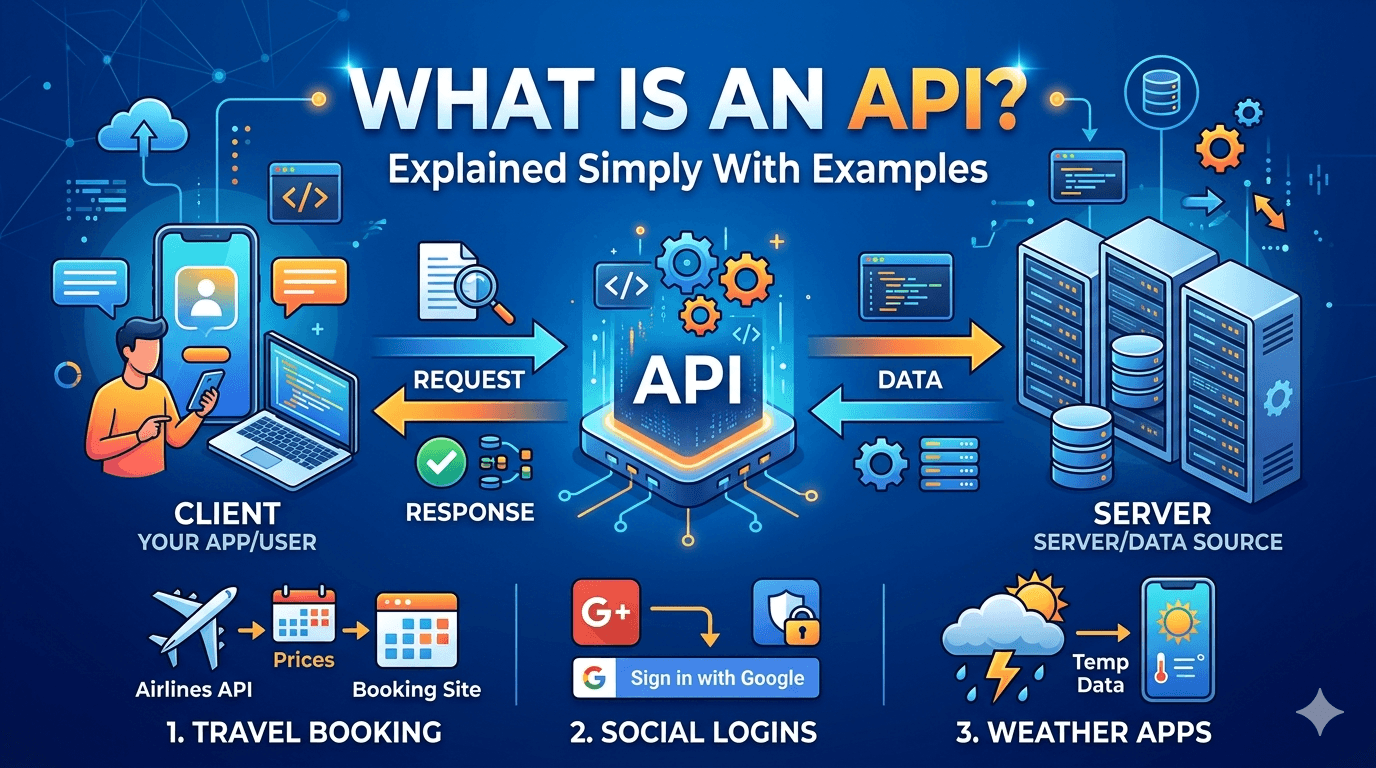
Every time you check the weather on your phone, log into a website using your Google account, or get a payment confirmation email after buying something online — an API made that happen.
APIs are everywhere. They’re the invisible plumbing behind virtually every digital product you use daily. And yet “API” remains one of those terms that technical people throw around casually while non-technical people nod along and quietly have no idea what it means.
That ends here.
This article explains what an API actually is, how it works, and why it matters — using analogies and examples that make the concept click rather than explanations that technically define it without actually illuminating anything.
The Problem APIs Solve (Before Defining What They Are)
The easiest way to understand APIs is to understand the problem they exist to solve.
Imagine you’re building a food delivery app. Your app needs to show users a map of nearby restaurants. You could build your own mapping system — gather satellite imagery, build routing algorithms, render tiles at every zoom level. That would take years and cost millions.
Or you could use Google Maps. Google has already built the best mapping infrastructure on the planet. Your app just needs a way to ask Google Maps: “hey, show a map of this location” — and Google Maps needs a way to respond: “here’s the map you asked for.”
That communication channel — the structured way one piece of software asks another piece of software to do something — is an API.
API stands for Application Programming Interface. Strip away the jargon and an interface is simply a point of contact between two systems. A light switch is an interface between you and your home’s electrical system — you don’t need to understand how electricity works, you just need to know how to use the switch. An API is the same concept, applied to software: a defined set of rules for how two applications talk to each other, without either needing to know how the other one works internally.
The Restaurant Analogy (That Actually Works)
Most API explanations use a restaurant analogy. Most of them also get it slightly wrong, so here’s a precise version.
You’re sitting at a restaurant table. You want food. The kitchen can make food. But you don’t walk into the kitchen and start cooking — that would be chaotic, dangerous, and the chef would rightly throw you out.
Instead, there’s a waiter. You tell the waiter what you want. The waiter takes your order to the kitchen in a standardized format the kitchen understands. The kitchen prepares the food. The waiter brings it back to you.
In this analogy:
- You are the application making the request (your weather app, your booking system, your website)
- The kitchen is the service being requested from (the weather data provider, the payment processor, the mapping service)
- The waiter is the API — the intermediary that takes your request in a structured format, delivers it to the service, and returns the response
The crucial detail: you never see inside the kitchen. You don’t know whether they’re using gas or electric stoves, whether one chef handles everything or it’s split by station. You just know that if you ask for the pasta in the right way, pasta arrives. The kitchen’s internal complexity is completely hidden from you.
This is what developers call abstraction — hiding complexity behind a simple interface. APIs let developers build on top of powerful infrastructure without understanding or replicating everything underneath.
A Real Example: What Happens When You “Sign in With Google”
The “Sign in with Google” button on websites is one of the most common API interactions most people experience — let’s walk through what’s actually happening.
Step 1: You click “Sign in with Google” on a third-party website — say, a project management tool you’re trying.
Step 2: The website sends a request to Google’s OAuth API: “I have a user who wants to authenticate. Here’s my app ID. Please verify their identity.”
Step 3: Google’s servers receive the request, recognize the app as legitimate, and show you Google’s own login screen.
Step 4: You enter your Google credentials. Google verifies them.
Step 5: Google sends a response back to the project management tool: “This user is authenticated. Here’s a token confirming it. Their name is [name] and their email is [email].”
Step 6: The project management tool receives the response, creates your account using the provided information, and logs you in.
The project management tool never saw your Google password. Google never saw what the project management tool does with the authentication. Both sides communicated through a clearly defined API — a structured request-response exchange that kept sensitive data secure while accomplishing the task.
Types of APIs: The Landscape Without the Overwhelm
When developers talk about APIs, they’re usually referring to web APIs — APIs that communicate over the internet using HTTP, the same protocol your browser uses to load web pages. There are a few different architectural styles, but one dominates modern development so thoroughly that it’s worth understanding specifically.
REST APIs — The Standard You’ll Encounter Everywhere
REST (Representational State Transfer) is an architectural style for building web APIs. It’s not a technology or a protocol — it’s a set of conventions that, when followed, produce APIs that are consistent, predictable, and easy to work with.
A REST API is organized around resources — things the API can interact with. A user is a resource. A product is a resource. An order is a resource.
Each resource has a URL address, and you interact with it using standard HTTP methods that map to intuitive actions:
| HTTP Method | Action | Example |
|---|---|---|
| GET | Retrieve a resource | GET /users/42 → get user with ID 42 |
| POST | Create a new resource | POST /orders → create a new order |
| PUT | Update an existing resource | PUT /products/7 → update product 7 |
| DELETE | Remove a resource | DELETE /comments/15 → delete comment 15 |
This convention is why REST APIs are said to be intuitive — if you know the resource structure, you can make reasonable guesses about how to interact with it. GET /articles probably returns a list of articles. GET /articles/5 probably returns the article with ID 5. DELETE /articles/5 probably deletes it.
What an actual API response looks like:
When you make a request to a REST API, the response typically comes back in JSON (JavaScript Object Notation) — a lightweight text format that’s easy for both humans and machines to read.
A request to a weather API for London’s current temperature might return something like this:
json
{
  "city": "London",
  "temperature": 14,
  "unit": "celsius",
  "condition": "overcast",
  "humidity": 78,
  "wind_speed": 22
}
Your app receives this structured data and decides what to display — maybe showing “14°C, Overcast” with a cloud icon. The API provided the raw data. Your app handled the presentation. Clean separation of responsibilities.
API Keys: The Bouncer at the Door
Most APIs you’ll work with as a developer — and many you use as a consumer without realizing it — require authentication before they’ll respond to your requests.
The most common mechanism is an API key: a unique string of characters that identifies who is making the request, similar to a password but designed for programmatic use rather than human login.
When you sign up for a weather API service, they generate an API key for you. Every request you send includes this key — usually in the request headers, invisible to end users. The API service logs which key made which requests, enforces rate limits (preventing any single caller from overwhelming their servers), and can revoke access if a key is misused.
This is why you should never share API keys publicly or commit them to public code repositories. An exposed API key is effectively a stolen identity for your application — someone else can make requests on your behalf, potentially running up usage bills or getting your account suspended.
The practice of keeping API keys in environment variables (rather than hardcoded in source files) is one of the first security habits every developer should develop.
APIs You Use Every Day Without Knowing It
The gap between “understanding APIs conceptually” and “actually feeling their presence” often closes when you realize how many everyday experiences depend on them.
Booking a flight: When you search for flights on Google Flights, Google’s interface sends requests to dozens of airline and booking system APIs simultaneously — pulling live inventory, pricing, and availability from each one and assembling the results into a single unified view. You see one search box. Underneath, dozens of APIs are responding in parallel.
Online payments: When you enter your card details on a checkout page, the website never actually processes your payment. It sends your card data to a payment processor API — Stripe, PayPal, or Adyen — which handles the entire transaction lifecycle. The website just receives back a confirmation (or a failure). This is why small websites can accept credit card payments without becoming banks.
Embedded maps: Every “Find us on the map” section on a business website, every delivery tracking interface showing a moving dot, every ride-sharing app displaying driver locations — all using the Google Maps or Mapbox API. The map functionality was built once by Google/Mapbox; every other application accesses it through the API.
Social media sharing: The “Share on Twitter/X” and “Share on LinkedIn” buttons on blog posts work through social platform APIs. When you click them, the button triggers an API call that opens the sharing dialog with your article’s title and URL pre-populated.
Login with social accounts: As covered above — OAuth APIs power every third-party authentication flow. The button exists on millions of sites; the authentication infrastructure belongs to Google, Apple, or Meta.
Public APIs vs Private APIs: The Distinction That Matters
Not all APIs are meant for everyone.
Public APIs (also called open APIs) are intentionally exposed for external developers to use. The Google Maps API, the Twitter/X API, the Spotify API, the GitHub API — these are services companies make available because they want developers to build on top of their platforms. Some are free up to usage limits; others are paid.
Private APIs are internal to a company or application. The API that your bank’s mobile app uses to fetch your transaction history — that’s a private API. It’s not documented for public use, it requires your authenticated session, and nobody outside the bank can call it. Most large applications are built from dozens of internal APIs communicating with each other, even if none of them are ever exposed publicly.
Partner APIs sit between these extremes — APIs shared with specific business partners under commercial agreements. A retailer might have a partner API that allows their approved suppliers to check inventory levels and submit restocking orders programmatically, without that API being available to the general public.
Why Developers Think in APIs
Once you start recognizing APIs everywhere, you start to understand something important about how modern software is built: almost no significant application builds everything from scratch.
Every application is an integration of APIs. Your e-commerce store uses a payment API, a shipping API, a tax calculation API, an email delivery API, and a customer review API — and the “application” you built is largely the orchestration layer that connects them all to a user interface.
This approach has a name: composability. You build by composing existing services rather than replicating them. The practical implication is that a small team can build something that would have required a hundred engineers a decade ago — because they’re standing on top of APIs that represent thousands of engineer-years of work they didn’t have to do.
Understanding APIs changes how you think about building software. Instead of asking “how do I build X?”, you start asking “is there an API that already does X, and can I use it?”
Most of the time, the answer is yes.
The Bottom Line
An API is a defined contract between two pieces of software — a set of rules for how one system requests something from another and receives a response, without either side needing to understand the other’s internal workings.
REST APIs use HTTP methods and URLs to create predictable, resource-based interfaces. JSON is the most common format for data exchange. API keys authenticate who’s making the requests.
Every time your phone shows you the weather, processes your payment, or displays a map — an API is doing the work you never see.
Understanding this isn’t just trivia for developers. It’s the mental model that explains how the modern web is actually built — and why building powerful things today requires less from scratch than it ever has before.
Up next: How to Find Winning Products to Sell Online in 2026 — research methods and tools that reveal what buyers actually want before you invest in inventory.